The Sony Vaio P70 Series notebook is the world’s lightest notebook; its weight is just 1.10 lbs and its dimension is 245×19.8×120 mm. It has 8-inch wide screen display with 1600 x 768 resolutions. The Vaio P70 notebook is more than your imagine. It is too small you can keep it on your pocket easily and use it anywhere like airport, park etc.
This P Series notebook has excellent features such as Atom Z520 @ 1.33 GHz Processor, 2 GB RAM, Intel US15W Chipset, VRAM, Intel High Definition Audio, 60 GB 4200 rpm HDD or SDD, SD Card Slot, Memory Stick Card Slot, LAN, Bluetooth, WiFi, USB2.0 x2 port, Web Camera, One Seg TV tuner, Qwerty keyboard.
The Sony Vaio P70 is available in three different colors Green, Red and White. It offers 4 hours battery life to its user and it available with Windows Vista OS. Its suggested cost is ¥ 92,500.00.
Via
Digg
Stumble Upon
Del.icio.us
Buzz
Sunday, August 30, 2009
Sony Vaio P70 world lightest notebook


TechCrunch Japan’s Tokyo Camp: 12 Startups Demo Their Wares
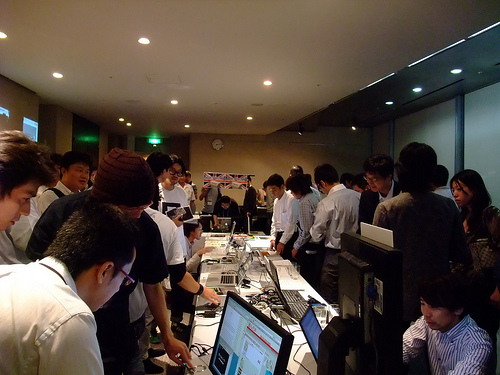
Following last week’s startup contest WISH 2009, Japan just got another event that gave twelve selected tech companies the chance to demo their web services, apps and tools (almost all of which are thankfully available in English). This Friday, around 130 guests attended Tokyo Camp [JP], a demo event organized by TechCrunch Japan.
The occasion: The blog, which is one of Japan’s biggest and mainly translates articles from TechCrunch into Japanese, is under new management (by DESIGN IT!, LLC., a Sociomedia (Japan’s anwer to Adaptive Path) group company).
Here are my thumbnail sketches of all of the twelve demos I saw at Tokyo Camp.
I’vRead by Akky Akimoto
Officially launched at Tokyo Camp, I’vRead keeps a record of all books you’ve read via your Twitter account and lets you find users with a similar taste in books. All you need to do is to type the title of the book (or its ISBN or Amazon URL), add “@ivread” to the tweet and (as an option) write what you thought of it. Each of these tweets will then be automatically added to your personal user page on the I’vRead site (you don’t need to register at the site itself, being a Twitter user is enough). Look here for an example.
dango
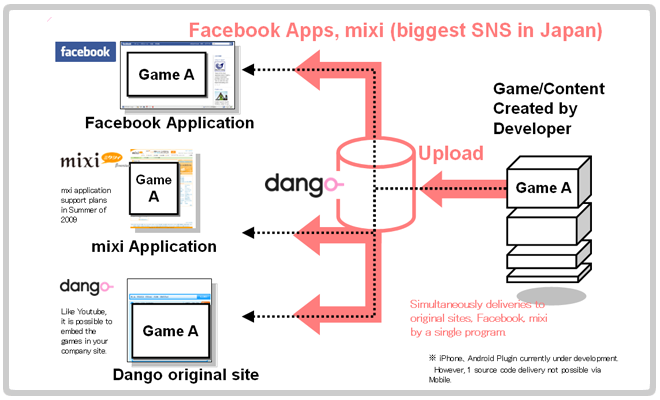
dango wants to empower online game creators worldwide to focus more on the development of content and less on the things they have to deal with after a game is finished, especially the distribution problem. The company of the same name offers a comprehensive, integrated framework called “dango-PLAY”. The system delivers online games to a number of social networks (i.e. Facebook or Japan’s Mixi) and dango’s homepage itself, using a single program and source code (dango is open source [JP]).
dango-Play aims at creating an integrated ecosystem for online games by matching users, linking to other games based on the framework, providing SMS services, managing user ID data, freeing developers from tracking user behavior etc. etc.
One of the first games that’s been released based on the dango system is Facebook app “meromero park”, an ultra-cute mix between a social network, a virtual world and a pet-rearing game (the web version has already gained massive popularity in Japan and Taiwan). The Facebook app is available in English and French.
Jin-Magic TCP Traffic Optimization Technology by Akira Jinzaki
A veteran network technology guru and a Chief Technologist in Residence at Breakthrough Partners, Akira Jinzaki has single-handedly programmed what appears to be a powerful TCP traffic controller with the potential to change the way Internet traffic is currently being managed (99% of the Internet traffic is TCP-based). Jinzaki says his Jin-Magic software manages TCP traffic in a cost-effective way that is transparent to the network to get the most out of the exiting plumbing.
The software can sit anywhere in the network between the two end-points. WiMAX was used for the demo. Reception in the demo room was 2 to 4 bars out of 6 and TCP transfer rates were at best 1Mbps (with standard set-up). Turn on the Jin-magic on the server side configured to maximize TCP flow, the rates climbed up in the 4Mbps to 7Mbps range. The technology allows providers to maximize service for their investments. It may enable mobile data providers to serve 2 to 3 times more customers with uninterrupted video bandwidth with the existing infrastructure. Jin-Magic can be ported to smartphones, too.
PeKay’s Little Author
PeKay’s Little Author is a Facebook application that lets users create a graphic story using original characters on-screen and print it out in the form of a picture storybook. Alternatively, the virtual storybook (example) can be shared with others online or turned into a web greeting card.
PeKay’s Little Author is the brainchild of a well-known Japanese artist. The video below shows how the app works:
IxEdit by Sociomedia
Launched at Tokyo Camp, IxEdit is a JavaScript-based “interaction design” tool for web applications that can be used from within the browser. Web designers can use IxEdit to practice DOM-scripting without having to code anything. The tool allows for elements of web pages that require “interaction”, i.e. pull-down menus, to be created with basic knowledge about HTML and CSS (no JavaScript coding is required).
IxEdit can be downloaded for free. View sample elements here.
Mobile Vein Authentication Technology by Universal Robot [JP]
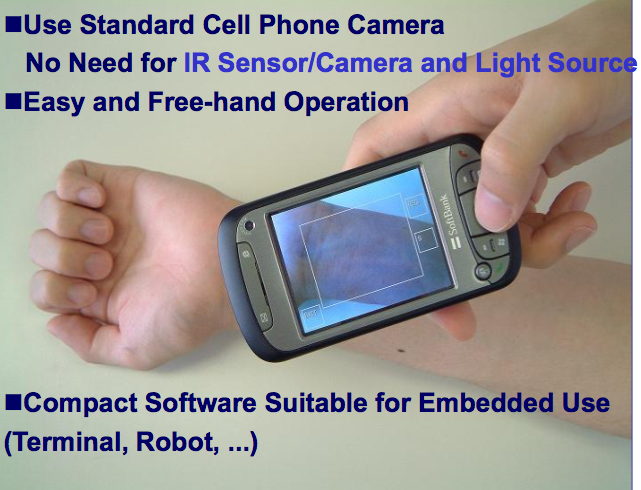
Universal Robot’s compact mobile vein authentication software (40KB core module) can be installed on cell phones, for example, and uses the camera to scan your wrist vein for identification. The technology seems to have many advantages: It works fast (I tried it myself), it’s completely software-based, compatible to a variety of CPUs and operating systems, usable for persons doing hard manual labor (who can’t use fingerprints), and most importantly extremely accurate (the company speaks of a false accept ratio of 0.001% and of a false reject ratio of less than 0.1%). The award-winning software works even with cameras with a 1MP sensor or lower.
Kuchikomi@Sousenkyo [JP] by Hottolink
Tokyo-based Hottolink has shown a self-developed word-of-mouth analysis tool (dubbed “Word Of Mouth@General Election Of The Lower House” in Japanese) that’s supposedly able to predict the results of the general election of Japan’s Lower House (according to CEO Koki Uchiyama) that took place just today.
The prediction tool analyzes what’s being written in Japan’s blogosphere about political topics dynamically (it updates its projected results daily). Uchiyama said internal tests with previous elections proved to be very promising. We’ll know if the prediction model really works on Monday morning Japanese time after the election results are official (I will deliver an update here later).
LogEarth
LogEarth requires a GPS logger or an iPhone GPS logger app to work. The service then records where you move around in the world (provided there’s a GPS signal) and visualizes your route with the help of Google Maps. The log data can be posted on blogs, too.
The 3 Augmented Reality Brothers [JP]
The 3 Augmented Reality Brothers aren’t really brothers, but their augmented reality project certainly had the highest show value at Tokyo Camp. Watch the Japanese video below to get an idea of what these guys are doing (their Vimeo channel is here).
AR3Bros episode-i | twitter & AR from ar3bros on Vimeo.
dodaii by Feynman
dodaii is anin-app purchase management ASP created for iPhone devs. The system handles the payment records for companies offering apps in the App Store for a fee. More information on dodaii can be found in this English PDF and here. dodaii is currently in closed beta.
Kanshin Kuukan [JP]
Kanshin Kuukan is a community site that helps its members find relevant products, restaurants, movies, songs etc. based on recommendations from users. The company of the same name showed a demo video of an iPhone app that scans the Twittersphere for relevant tweets and is scheduled for release in December (Japanese only).
Manetron
Manetron is an iPhone app that puts a Mellotron (an electro-mechanical, vintage keyboard) in your pocket. The app is available in the App Store for $2.99. Watch the video below to see and hear how Manetron works.
Many thanks to all attendees and demo companies who helped making Tokyo Camp a blast. And sorry to everyone who didn’t make it on the guest list this time (just like last time, we were overwhelmed by the response), but another event like this might happen again in the near future. Arigatou gozaimasu!
More pictures from the event were made by alpha blogger Masaki Ishitani and TechCrunch Japan’s translator Umihiko Namekawa.
Information provided by CrunchBase










Top 10 Tactics for Productive Travel [Lifehacker Top 10]
Being able to work just about anywhere is a mixed blessing. If you're tired of dying batteries, lost receipts, absent files, and laptop theft paranoia, pick up on our top 10 tactics for a better life on the road.
Photo by n0nick.
10. Keep track of everything
Your car's parked in section H14 of the airport. Dinner with the clients has been changed to 8 p.m. Your daughter would really love that bag you saw in that little shop downtown, and you must not forget to grab your raincoat from the hotel closet, like you always do. A tool that follows you everywhere, like the brain-expanding Evernote, the very iPhone-friendly reQall, or politely nagging/reminding to-do systems like Remember the Milk or Todoist might be perfect for your needs. Then again, you might be like so many Lifehacker readers and find that, for your task management and remember-it-or-else purposes, pen and paper is the ultimate portable tool.
9. Find your saving grace: free Wi-Fi
$12 per day airport Wi-Fi is like a $60 steak entree at a restaurant with leather seating—it only exists because expense accounts also exist. For those of us footing our own bill, there's usually a free alternative to the billing demands of coffee shops and air travel waypoints. Gina did us all a favor by rounding up the definitive guide to locating free Wi-Fi, covering the bases from free-as-in-beer offerings to hoping somebody doesn't mind you're tip-toe-ing past their very weak encryption. It's definitely worth the print-out or, more practically, a "Save Page As."
8. Tether your phone for emergency email & directions
From experience, we can tell you that even a great 3G cellphone connection feels a little slow when sent through a laptop browser. That said, Wi-Fi is sometimes an absolute no-go, and you'll need to find out exactly how to get around that parade to the conference center or dash out a long enough email that cellphone-keypad typing isn't feasible. Before your trip, or with some time in your hotel, you can enable tethering on an iPhone or your Palm Pre, or tether an Android, Windows Mobile, BlackBerry, (jailbroken) iPhone, or even (older) Palm OS phone with PdaNet. Android owners can also root their phones for the easiest Wi-Fi tethering we've ever seen.
7. Protect your laptop
First things first: If your laptop and all its data access aren't tucked behind great but memorable passwords, they need to be. Beyond that, tools like Laptop Alarm for Windows can help prevent your system from being nabbed while it's running (hello coffee shop snatchers), while LaptopLock is the best post-theft data protector and thief finder we know of for Windows systems. Mac users have the similarly clever iAlertU to use the MacBook's webcam that works as a car alarm for your laptop, snapping a picture of the thief and sounding an alarm when a potential thief tries grabbing your armed laptop, then emails the pic to you so you can hopefully identify the culprit. (Original post)
6. Get set up with smart SMS services
For at least a year, I carried an iPod touch around with my "dumb" cellphone, using the iPod's Wi-Fi and apps when I could, but using text message services whenever I really needed to pull up information or send myself something important. What I learned was that a host of services can work almost entirely through SMS, but they don't all promote that fact very well. Google Calendar can send you today's or tomorrow's agenda, Amazon can price items for you, Twitter can set a timer and text you back (assuming you have direct messages sent to your phone), and many other services offer similar functionality. Even if they claim it's an email service, you can send an SMS to that email address to follow through—all great reasons to claim your constant texting is really just practice for faster productivity. (Original post)
5. Get better life from batteries
First of all, get yourself a spare battery for rechargeable devices like your laptop or other gadgets. Use your spare batteries fully when you're going to use them, then recharge them to around 50-percent full and keep them someplace cool, like wrapped in a paper towel inside the fridge, to increase their shelf life. Keep your cell phone out of your pocket if you want to extend its battery life (the extra heat decreases its battery life). Every so often, charge your battery all the way full, then run it completely down to recalibrate its sense of how much it can hold. Don't run your battery somewhere it will get very hot, and turn off Wi-Fi and fancy graphics effects when you're really just editing a Word document. Those are just a few of the take-away battery tips we've collected and dissected over years of use and discussion, but they're a pretty good beginner's course in squeezing every last bit of rare travel power from your devices. (Original post)
4. Carry an Altoids-sized "survival" kit
We're fans of Altoids tins, as they're durable, compact, inexpensive, and they come with a tasty treat. They can also fit easily in your pocket or go-bag and are perfect for carrying essential medical and mending gear, which will make you the hero of anyone who nicks themselves, or even needs to know which way is North in a strange city. If you're less of a survivalist and more of a maker, you could check out the "maker's tin," for a big dose of DIY ingenuity in a tiny metal container. Make sure to pack it in a way that lets you keep it in your laptop/to-go bag at all times, so you'll always be the guy who's surprisingly prepared on every trip.
3. Manage your travel expenses
If the back of your wallet or bottom of your purse isn't quite cutting it as a receipt management system, try out a system like Xpenser, which lets you call a free number and simply ramble out something like "dinner 58 with Albertson Associates;" alternately, you can quickly add your expense via their web site or SMS. You'll later see a $58 dinner cost neatly tagged to the right date and client. Your accountant, your tax preparer, and your former shoebox stronghold will appreciate your small efforts. If you'd rather mail copies or take digital photos or scans of your receipts post-facto, Shoeboxed has you covered. (Original post)
2. Float between online and offline files
Until I'd talked to four different people last week who didn't know that Zoho, Google's Docs, Calendar, Reader, and Gmail services, Remember the Milk tasks, and many other services could be managed offline with Google Gears, I'd though it was an old-hat piece of advice. Consider this a friendly reminder, then, that the five minutes it takes to install Gears, click the "Offline" or green check mark icon on the Gears-supporting web site, and synchronize your online life is entirely worth it. And if you haven't grabbed a free account from Dropbox, SugarSync, or another cross-platform, web-accessible synchronization service, that, too, will be a lifesaver on some rainy day when you're much too rushed to prepare all your files before you head to the airport.
1. Properly pack your laptop/go bag
We can't tell you exactly what you'll need for every trip, but we can suggest the cables, containers, notepads, spare batteries, portable Wi-Fi routers, and many other items that have saved our editors' and readers' travel-weary butts on many occasions. A week-long, ever-so-slightly-navel-gaze-y series on what our editors pack in their laptop bags culminated in a multi-bag roundup. Further back, our endlessly creative and forward-thinking readers offered their own views at their daily and long-distance travel bags in three photo-stuffed installments. Peruse, poke fun, but more than anything, take them as examples of how you can make life on the road a bit more comfortable and predictable.
That's how we roll, at least when we're heading out farther than the coffee shop or coworking spot. Tell us, and your fellow weary wanderers, your most essential, trip-saving tips and tactics in the comments.


via feeds.gawker.com
Saturday, August 29, 2009
RSS is how the news flows
Home > Archive > 2009 > August > 26
RSS is how the news flows
Wednesday, August 26, 2009 by Dave Winer.
To Sam Diaz who says RSS was "a good idea at the time but there are better ways now," I have many things to say.
1. People confuse RSS with Google Reader. Let's be clear that there's a difference. Google Reader is an application that reads RSS-formatted data. There are many other applications that read and write RSS.
2. I think Google Reader was, on the whole, a good thing. It's probably the best reader of its variety. You have to go find the new stuff in Google Reader. I prefer a reader that finds the new stuff for me, and presents it in reverse chronologic order. This is known as a river of news reader.
3. Diaz more or less says that's his preference too. Interesting.
4. My newspaper doesn't tell me how many articles I haven't read going back to the date of my birth. I bet it would be in the millions. Why should I care. This was the worst idea ever in news readers.
5. The core problem -- so many programmers who write RSS software are not themselves news junkies. If they were they'd know when they got it wrong. News is about what's new! Show me the newest stuff first. Sorry to all the articles I didn't read, maybe in the next lifetime.
6. He may not use a RSS reader, but the news is still getting to him through RSS.
7. If all the RSS on the planet were all of a sudden to stop updating (key point) the news would stop flowing. Any news guy or gal who thinks they could get by without RSS -- think this through a bit more. We all love the Internet, but don't shut off your gas and electric because your computer and router wouldn't work without electricity. Same with RSS and news. RSS is how the news flows, whether you see it or not. If not RSS, something exactly like RSS.
8. The Internet is layered. New technology comes on line building on tech that already existed. RSS was like that. It built on XML and HTTP, which built on text and TCP/IP. The new things that Diaz likes so much, in exactly the same way, build on RSS.
9. When news authors don't understand how technology evolves, they propagate incorrect notions to everyone else, including would-be inventors, who have to figure it out for themselves, and then convince investors and partners they know what they're doing -- when they just read in ZDNet that things don't evolve at all. So Mr. Diaz does us all a disservice.
10. I object when technology writers tell the story of technology incorrectly. People say I should just be happy to see my name in the story, or in this case something that I fathered. No deal. I want the accurate story out there. I want people to understand how technology really works, because that's central to users being empowered by it, instead of being controlled by it.
Bonus: Marshall Kirkpatrick, my partner in the Bad Hair Day podcast (tomorrow 7PM Pacific) has his own excellent rebuttal to the Diaz piece.
View the forum thread.


via scripting.com
Tweetmeme launches massive upgrade to Version 2
Tweetmeme launches massive upgrade to Version 2
By Martin Bryant on August 28, 2009UPDATE: The new version of Tweetmeme is live. Our initial thoughts, including screenshots, are below the original post.
You may have noticed that we haven’t had retweet buttons on today’s posts here at The Next Web. Why? They haven’t been working. Tweetmeme, the company behind our retweet buttons, took the service down for maintenance this morning with no warning and it’s still down now.
There’s good reason though, Tweetmeme Version 2 is launching imminently.
The upgrade sees the service take a step forward following the recent launch of competitor Retweet.com (which, it has been claimed, uses Tweetmeme code). Tweetmeme is also working with JS-Kit to incorporate Tweetmeme into its Echo blog comment system.
Here’s what’s planned:
The upgrade is called Tweetmeme ‘V2’ as today’s release really is a complete revamp of the site that encompasses a total rewrite of the scoring system, filtering engine and a whole raft of user interface enhancements and tweaks. It also incorporates the new commenting system.
UPDATE: The new version is now live. So what’s it like?
The first upgrade we looked at is the analytics feature. For each retweeted post you get graphs for tweets in the past hour, tweets in the past day, a pie chart showing where tweets came from and analysis of recent retweets:
In addition, there’s a new comments tab allowing comments to be posted directly to Tweetmeme’s site. This can be posted to Twitter (via OAuth) with a link back to the discussion on Tweetmeme. Comments are displayed in pseudo-realtime like Facebook – a notification inviting you to refresh the page to see them. As you can see, Nick Halstead, CEO of Tweetmeme, replied to my comment. These replies can optionally be sent as Twitter replies too.
This is obviously an attempt to get more conversation happening directly on Tweetmeme. How likely this will be to happen, I’m not sure – Tweetmeme has always been about tracking Twitter links, not content discussion. Still, it’s an interesting move and one that sets it apart from Retweet.com.
Here’s the full changelog straight from Tweetmeme:
Highlights
· The new ‘retweeting’ commenting platform
· A new user timeline that shows retweets and comments in a river.
· V3 of our Filtering Engine, codenamed ‘Pickle’
· Better RSS feeds (by Category, Channel, User or Domain)
· Simple story analytics (to be followed next week with full analytics package)
· A new bookmarklet that lets you find any webpage back on TweetMeme.
· A new ‘tweets’ analyzer that only shows ‘unique’ tweets for one particular story.
Ranking Content
The new site will have more varied and better quality content, this is achieved through better scoring of stories including a new ‘kudos’ score for individual Twitter users, plus we have a new ‘reporting’ mechanism allowing our users to flag content as abusive, spam or ‘This Sucks!’</p>
Filtering Content
The filtering engine is now at Version 3 codenamed ‘Pickle’ – this is our most advanced system yet allowing the real-time filtering of 10’s of millions of stories per day based upon our own programming language ‘Pickle Code’. This release is future proof for scalability and also allows us to plug in new data sets as they become available. Included on the right is a screenshot of our tool that allows us to drag and drop rules that produces ‘Pickle Code’ – In the coming weeks we will do a feature on the architecture of this new system.
Commenting + Partnership Announcement
The new commenting system also goes live, this includes the ability to retweet individual comments (when they are good!) replying to multiple users, live updates and a really tight integration into Twitter.
TweetMeme is also working with the team at JS-Kit to import the comments into the Echo. TweetMeme will also be recommending and distributing Echo as the preferred solution to track the distributed conversation on blogs.


Subscribe to:
Comments (Atom)